




- Posts: 10
- Thank you received: 0
Lancer qtVlm en batch
- yannis.karyotakis@gmail.com
- Topic Author
- Offline
- New Member
-

Less
More
3 months 3 weeks ago #3606
by yannis.karyotakis@gmail.com
Replied by yannis.karyotakis@gmail.com on topic Lancer qtVlm en batch
Voila!
<?xml version="1.0" encoding="UTF-8"?>
<runs>
<run>
<exportFolder> /temp</exportFolder>
</run>
<run>
<closeAllGribs>true</closeAllGribs>
<clearAllRoutes>true</clearAllRoutes>
<gribSlot1>/XYGribFiles/Mai-2025/Aegean_SW_4km_WRF_WAM_250502-00.grb.bz2</gribSlot1>
<gribSlot2></gribSlot2>
<gribSlot3></gribSlot3>
<routingName>Routing2</routingName>
<endPoint>Poros</endPoint>
<startPoint>start</startPoint>
<startDate>05/02/2025</startDate>
<startTime>09:00:00</startTime>
<noRouteOutsideScreen>true</noRouteOutsideScreen>
<multiRouting>false</multiRouting>
<convertToRoute>true</convertToRoute>
<autoSimOptim>true</autoSimOptim>
</run>
<run>
<exportRoutesLogs>true</exportRoutesLogs>
</run>
</runs>
<?xml version="1.0" encoding="UTF-8"?>
<runs>
<run>
<exportFolder>
/temp</exportFolder></run>
<run>
<closeAllGribs>true</closeAllGribs>
<clearAllRoutes>true</clearAllRoutes>
<gribSlot1>
/XYGribFiles/Mai-2025/Aegean_SW_4km_WRF_WAM_250502-00.grb.bz2</gribSlot1><gribSlot2></gribSlot2>
<gribSlot3></gribSlot3>
<routingName>Routing2</routingName>
<endPoint>Poros</endPoint>
<startPoint>start</startPoint>
<startDate>05/02/2025</startDate>
<startTime>09:00:00</startTime>
<noRouteOutsideScreen>true</noRouteOutsideScreen>
<multiRouting>false</multiRouting>
<convertToRoute>true</convertToRoute>
<autoSimOptim>true</autoSimOptim>
</run>
<run>
<exportRoutesLogs>true</exportRoutesLogs>
</run>
</runs>
Please Log in or Create an account to join the conversation.
- maitai
- Offline
- Administrator
-

Less
More
- Posts: 1273
- Thank you received: 25
3 months 3 weeks ago #3607
by maitai
Replied by maitai on topic Lancer qtVlm en batch
Il y a ptet déjà un Routing2 qui existe?
La date de départ est compatible avec le grib et le grib couvre la zone ?
Les POIs "start" et "Poros" existent ?
Je viens d'essayer quelque chose de similaire, ca fonctionne comme ca doit ici
<?xml version="1.0" encoding="UTF-8"?>
<runs>
<run>
<closeAllGribs>true</closeAllGribs>
<clearAllRoutes>true</clearAllRoutes>
<gribSlot1>C:/qtDev/qtVlm/grib/20260325_095303_AROME_P025_WW3_P50_00.grb2</gribSlot1>
<gribSlot2></gribSlot2>
<gribSlot3></gribSlot3>
<routingName>Routing2</routingName>
<endPoint>POI_end</endPoint>
<startPoint>POI_start</startPoint>
<startDate>03/25/2026</startDate>
<startTime>10:00:00</startTime>
<noRouteOutsideScreen>true</noRouteOutsideScreen>
<multiRouting>false</multiRouting>
<convertToRoute>true</convertToRoute>
<autoSimOptim>true</autoSimOptim>
</run>
<run>
<exportFolder>C:/qtDev/qtVlm/export</exportFolder>
<exportRoutesLogs>true</exportRoutesLogs>
</run>
</runs>
La date de départ est compatible avec le grib et le grib couvre la zone ?
Les POIs "start" et "Poros" existent ?
Je viens d'essayer quelque chose de similaire, ca fonctionne comme ca doit ici
<?xml version="1.0" encoding="UTF-8"?>
<runs>
<run>
<closeAllGribs>true</closeAllGribs>
<clearAllRoutes>true</clearAllRoutes>
<gribSlot1>C:/qtDev/qtVlm/grib/20260325_095303_AROME_P025_WW3_P50_00.grb2</gribSlot1>
<gribSlot2></gribSlot2>
<gribSlot3></gribSlot3>
<routingName>Routing2</routingName>
<endPoint>POI_end</endPoint>
<startPoint>POI_start</startPoint>
<startDate>03/25/2026</startDate>
<startTime>10:00:00</startTime>
<noRouteOutsideScreen>true</noRouteOutsideScreen>
<multiRouting>false</multiRouting>
<convertToRoute>true</convertToRoute>
<autoSimOptim>true</autoSimOptim>
</run>
<run>
<exportFolder>C:/qtDev/qtVlm/export</exportFolder>
<exportRoutesLogs>true</exportRoutesLogs>
</run>
</runs>
Please Log in or Create an account to join the conversation.
- yannis.karyotakis@gmail.com
- Topic Author
- Offline
- New Member
-
Less
More
- Posts: 10
- Thank you received: 0
3 months 3 weeks ago #3608
by yannis.karyotakis@gmail.com
Replied by yannis.karyotakis@gmail.com on topic Lancer qtVlm en batch
Ok merci, je pense que j'ai une idee. Mon Start et mon End PIO sont pres des cotes et du coup le routage ne se fait pas. Ca fonctionne bien si les 2 POIs sont loin des cotes. En version manuelle, je lui dit de passer a 0.1 nm des cotes. Mais je ne vois pas de commande batch analogue
Please Log in or Create an account to join the conversation.
- maitai
- Offline
- Administrator
-
Less
More
- Posts: 1273
- Thank you received: 25
3 months 3 weeks ago #3609
by maitai
Replied by maitai on topic Lancer qtVlm en batch
Il n'y en a pas, ca utilise les settings définis pour ce genre de chose
Please Log in or Create an account to join the conversation.
- yannis.karyotakis@gmail.com
- Topic Author
- Offline
- New Member
-
Less
More
- Posts: 10
- Thank you received: 0
3 months 3 weeks ago #3610
by yannis.karyotakis@gmail.com
Replied by yannis.karyotakis@gmail.com on topic Lancer qtVlm en batch
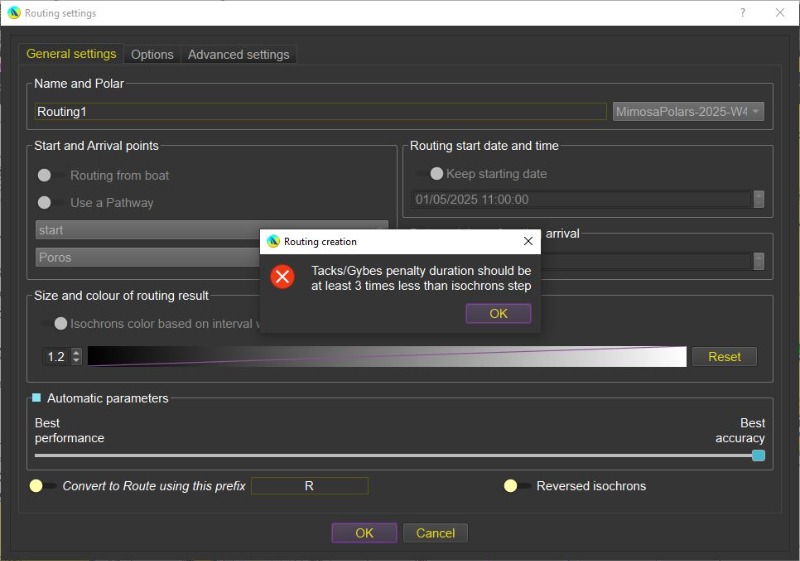
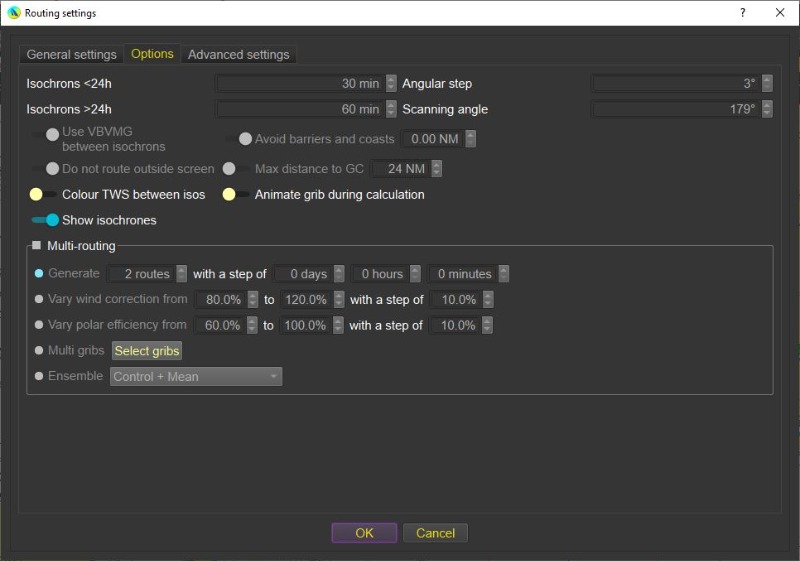
Voici pourquoi le routage ne se fait pas, en 2nde photo le code erreur et en 1ere le panel options. Il y a une difference entre le routage manuel et en batch sur la duree isochrones 24h. En batch c'est 30 min et en manuel 60min,
Encore merci pour votre temps
Encore merci pour votre temps
Please Log in or Create an account to join the conversation.
- maitai
- Offline
- Administrator
-
Less
More
- Posts: 1273
- Thank you received: 25
3 months 3 weeks ago #3611
by maitai
Replied by maitai on topic Lancer qtVlm en batch
Le mode batch utilise les settings du dernier routing fait. Il faut changer ca, ou réduire les pénalités de changement d'amure. Tout ca ne sont pas des bugs.
Please Log in or Create an account to join the conversation.
Time to create page: 0.127 seconds