




- Posts: 6
- Thank you received: 0
QTVLM Android – Cannot set alarms due to overlay window issue
- gmerendino
- Topic Author
- Offline
- New Member
-

Less
More
2 months 1 week ago #3939
by gmerendino
QTVLM Android – Cannot set alarms due to overlay window issue was created by gmerendino
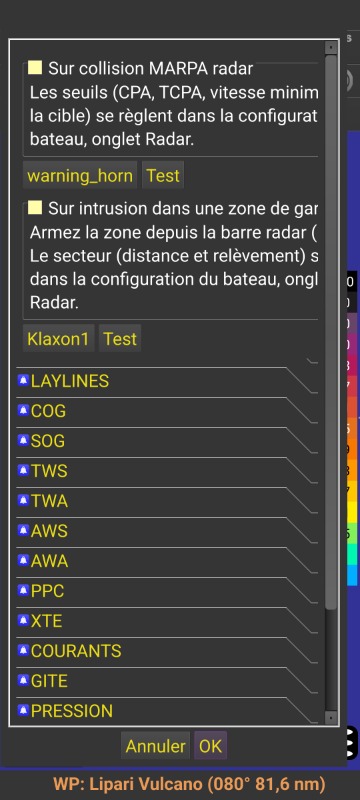
Hi everyone,I'm running into a frustrating issue with the Android version of QTVLM and was hoping someone here might have encountered the same problem or have a workaround.When I try to set an alarm on the Android app, I can't complete the process because an extra selection window pops up and overlays the normal alarm setup interface. This window doesn't appear when using the PC version – everything works fine there. On Android, however, it blocks the view and prevents me from actually selecting or confirming any alarm settings.I've attached a screenshot so you can see exactly what I mean.Has anyone else experienced this? Is there a setting I'm missing, or is this a known bug in the Android build? Any help or suggestions would be greatly appreciated.Thanks in advance!
Please Log in or Create an account to join the conversation.
- maitai
- Offline
- Administrator
-

Less
More
- Posts: 1299
- Thank you received: 31
2 months 1 week ago #3940
by maitai
Replied by maitai on topic QTVLM Android – Cannot set alarms due to overlay window issue
I confirm the issue, we will fix that asap
The following user(s) said Thank You: gmerendino
Please Log in or Create an account to join the conversation.
- gmerendino
- Topic Author
- Offline
- New Member
-
Less
More
- Posts: 6
- Thank you received: 0
2 months 1 week ago #3941
by gmerendino
Replied by gmerendino on topic QTVLM Android – Cannot set alarms due to overlay window issue
I tried to work around it by manually editing the .ini configuration file and setting both alarmOn=1 and soundOn=1. Unfortunately, even after doing that, no sound is played when the alarm should trigger. So it seems like the issue might go beyond just the UI overlay – the sound generation itself may also be broken on Android.
Please Log in or Create an account to join the conversation.
- gmerendino
- Topic Author
- Offline
- New Member
-
Less
More
- Posts: 6
- Thank you received: 0
2 months 1 week ago #3942
by gmerendino
Replied by gmerendino on topic QTVLM Android – Cannot set alarms due to overlay window issue
Since I couldn't set the alarm through the UI, I tried to work around it by manually editing the
configuration file and setting both
and
. Unfortunately, even after doing that, no sound is played when the alarm should trigger. So it seems like the issue might go beyond just the UI overlay – the sound generation itself may also be broken on Android.
Code:
.ini
Code:
alarmOn=1
Code:
soundOn=1
Please Log in or Create an account to join the conversation.
- maitai
- Offline
- Administrator
-
Less
More
- Posts: 1299
- Thank you received: 31
2 months 1 week ago #3943
by maitai
Replied by maitai on topic QTVLM Android – Cannot set alarms due to overlay window issue
Modifying the ini directly is dangerous and not recommended at all, you risk to loose everything.
Let's wait a couple of hours or so and you will have a fix.
Let's wait a couple of hours or so and you will have a fix.
Please Log in or Create an account to join the conversation.
- maitai
- Offline
- Administrator
-
Less
More
- Posts: 1299
- Thank you received: 31
2 months 1 week ago #3944
by maitai
Replied by maitai on topic QTVLM Android – Cannot set alarms due to overlay window issue
Which Android version are you running ?
Please Log in or Create an account to join the conversation.
Time to create page: 0.146 seconds